Tower fan maintenance is crucial for longevity and optimal performance, with most models requiring cleaning every 2 weeks to 3 months depending on usage. Regular cleaning prevents dust and debris buildup, which can reduce airflow by up to 30%, decrease energy efficiency, and shorten the appliance’s lifespan. By following a consistent maintenance schedule, users can ensure their tower fan operates quietly and effectively for many years.
This comprehensive guide is designed to empower you with expert knowledge and practical tips, ensuring your new tower fan not only performs optimally but also lasts for years to come. From simple exterior dusting to advanced deep cleaning and troubleshooting common issues, we’ll cover everything you need to keep your tower fan running like it’s brand new.
Why Regular Tower Fan Maintenance is Crucial
Understanding the “why” behind maintenance can motivate you to keep your tower fan in top condition. Beyond aesthetics, a clean fan offers tangible benefits for your health and wallet.
Enhanced Performance and Airflow
Dust and debris act as silent obstructors, clinging to grilles, vents, and internal fan blades. This buildup impedes the fan’s ability to draw in and expel air efficiently. Regular cleaning ensures unobstructed airflow, allowing your fan to deliver maximum cooling power without having to work harder.
Improved Air Quality
A dirty tower fan doesn’t just push air around; it actively circulates accumulated dust, pollen, pet dander, and other airborne allergens throughout your living space. This can exacerbate allergies and respiratory issues. By regularly cleaning your fan, you actively contribute to a healthier indoor environment, reducing the spread of these unwanted particles.
Extended Lifespan and Energy Efficiency
When a fan’s internal components are caked with dust, its motor has to exert more effort to spin the blades and maintain airflow. This increased strain leads to premature wear and tear, potential overheating, and a shorter overall lifespan for the appliance. A clean, well-maintained fan operates more efficiently, consuming less energy and potentially saving you money on electricity bills over time. It’s a small effort that yields significant long-term returns.
Quieter Operation
Many common tower fan noises—like rattling, buzzing, or squeaking—are direct results of dust buildup or loose internal components. Regular cleaning and occasional inspection for loose parts can significantly reduce these disruptive sounds, allowing your fan to provide a quiet, soothing breeze.
Preventing Costly Repairs
Proactive maintenance helps you identify minor issues before they escalate into major, expensive problems. Addressing dust buildup, checking electrical connections, and ensuring blades are balanced can prevent motor failure or the need for professional repairs, saving you both time and money.
Essential Tools for Tower Fan Cleaning
Before you begin any cleaning or maintenance task, gathering the right tools will make the process smoother and more effective. Always prioritize safety by unplugging your tower fan from its power source before you start.
Here’s a list of the essential supplies you’ll need:
- Soft Microfiber Cloths: Ideal for wiping down exterior surfaces without scratching.
- Vacuum Cleaner with Brush Attachment: Excellent for suctioning dust from vents and accessible internal components.
- Small Soft Brush or Old Toothbrush: Perfect for dislodging stubborn dust from tight crevices and grilles.
- Can of Compressed Air: Essential for blowing dust out of hard-to-reach internal areas, especially for non-disassemblable or bladeless models.
- Cotton Swabs: Useful for detailed cleaning in very narrow spaces.
- Screwdriver Set (Phillips and Flathead): Necessary if your fan model allows for disassembly.
- Mild Dish Soap or All-Purpose Cleaner: For cleaning removable parts (like grilles) or stubborn exterior grime (used sparingly on a damp cloth).
- Warm Water: For dampening cloths or washing removable parts.
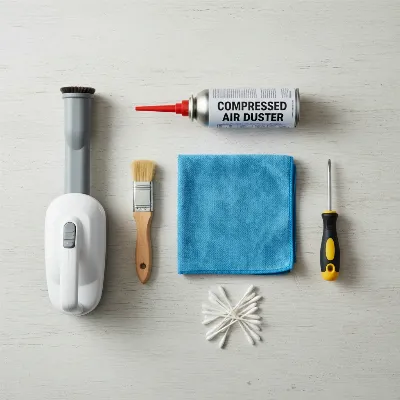 Essential Tools for Tower Fan Maintenance and Deep Cleaning
Step-by-Step Guide to Cleaning Your Tower Fan
Whether you opt for a quick surface clean or a thorough deep cleaning, following these steps will ensure your tower fan remains in pristine condition.
Preparatory Steps: Safety First
|
Our Picks for the Best Tower Fan in 2026
As an Amazon Associate I earn from qualifying purchases.
|
||
| Num | Product | Action |
|---|---|---|
| 1 | Honeywell QuietSet Whole Room Oscillating Tower filter Fan with Remote, White, HYF260 |

|
| 2 | PELONIS 40-Inch Tower Fan for Bedroom, Fan That Blows Cold Air, Oscillating Fan with Innovative Washable Design, 2000 CFM, 28ft/s Airflow, 4 Speeds + 2 Modes, 90° Oscillation, 23dB Quiet |
|
| 3 | Dreo Tower Fan for Bedroom, 25ft/s Velocity Quiet Floor Fan, 90° Oscillating Fans for Indoors with 4 Speeds, 4 Modes, 8H Timer, Bladeless Fan, Standing Fans, Silver, Nomad One (DR-HTF007) |
|
| 4 | DREO Tower Fan for Bedroom, 4 Speeds, 3 Modes Standing Fans for Room with 90° wide Oscillating, 28dB Quiet for Sleep, 25ft/s Velocity, 29ft Coverage, 8H Timer, Remote, Living Room, Office, Home, White |
|
| 5 | Dreo Tower Fan for Bedroom, 2026 Upgraded DC Motor, 28ft/s High Velocity, 20dB Ultra Quiet Standing Fan, 8 Speeds 4 Modes, 90° Oscillating Bladeless Fan for Indoors, Floor Fans with Remote, Black |
|
| 6 | Lasko Elevation Adjustable Tower Fan 42”-54”, Pedestal Fan, 31 ft/s Airflow, Quiet 28 dB, 90° Oscillation, 12h Timer, Remote, Black, EST100 |
|
| 7 | Honeywell QuietSet Whole Room Tower Fan-Black, Oscillating Tower Fan with Remote, HYF290B |
|
| 8 | Lasko High Velocity Oscillating Tower Fan for Bedroom, Garage, Basement, and Gym with Remote Control, Timer, 3 Powerful Speeds, 35" Silver/Black, U35115 |
|
| 9 | LEVOIT Tower Fan for Bedroom, 25ft/s Velocity Standing Fan with 28dB Quiet for Sleep, Remoter, 12H Timer, 5 Speeds, 4 Modes, 90° Oscillation for Home, Office, Indoor, Bladeless 36 inch, White |
|
| 10 | Dreo Tower Fan for Bedroom, 90° Oscillating Standing Fans for Room with 4 Speeds, 3 Modes, 28dB Quiet for Sleep, 25ft/s Velocity, 8H Timer, Remote, Living Room, Office, Home, Black |
|
- Unplug the Fan: This is the most critical safety step. Always ensure your tower fan is completely disconnected from the power outlet before touching any part of it. This prevents electrical hazards and accidental activation.
- Choose a Workspace: Move your fan to a well-ventilated area, preferably outdoors or near an open window, especially if you plan to use compressed air. This helps prevent dust from resettling in your home.
- Consult Your User Manual: Before attempting any disassembly, always refer to your specific tower fan’s user manual. Some models are not designed to be opened, and attempting to force them apart could void your warranty or cause damage.
Exterior Cleaning: The First Line of Defense
Start with the easiest part – cleaning the outside of your fan.
- Wipe Down the Outer Casing: Use a soft, dry microfiber cloth to wipe down the entire exterior surface of your tower fan, including the control panel, base, and oscillation column. This removes loose dust and grime.
- For Stubborn Grime: If there are sticky spots or more stubborn dirt, lightly dampen your microfiber cloth with warm water and a tiny drop of mild dish soap or all-purpose cleaner. Wring it out thoroughly so it’s barely damp, then wipe the affected areas. Immediately follow up with a dry cloth to remove any moisture. Never spray liquid directly onto the fan or allow water to seep into vents or openings.
Vent and Grille Cleaning: Tackling Visible Dust
The vents and grilles are where most of the airborne particles get trapped.
- Vacuum the Vents: Attach the brush nozzle to your vacuum cleaner. Run it over all the air intake and outlet vents (usually located on the front, back, or sides of the fan). Work the brush attachment into the openings to dislodge and suction as much dust, lint, and pet hair as possible.
- Blast with Compressed Air: For dust lodged deeper within the vents that the vacuum can’t reach, use a can of compressed air. Hold the nozzle close to the vents and spray in short bursts, moving up and down the vent. This will blow out trapped dust. Be prepared for a cloud of dust, which is why a well-ventilated area is important.
- Brush Tight Spaces: For extremely tight slats or intricate grille designs, an old toothbrush or a small, soft-bristled brush can be invaluable. Gently brush between the openings to loosen debris, then follow up with the vacuum or compressed air.
Deep Cleaning: Disassembly for Thoroughness (If Applicable)
If your tower fan allows for safe disassembly, a deep clean can significantly improve its performance.
- Remove the Base (Optional but Recommended): Some tower fans can be detached from their base by unscrewing them from underneath or by releasing clips. This can make the unit easier to handle and provides better access to the bottom vents.
- Access Internal Components: Locate the screws on the back panel or casing of your tower fan. These are usually small Phillips head screws. Carefully remove them, keeping them in a safe place so they don’t get lost.
- Gently Separate the Casing: Once screws are removed, carefully pry the casing halves apart. Some models may have hidden clips or tabs that need to be gently released with a flathead screwdriver. Work slowly and patiently to avoid breaking the plastic tabs, which can lead to a rattling fan after reassembly. If the panels don’t budge easily after checking for all screws, do not force them; your model might not be designed for user disassembly.
- Clean the Impeller (Fan Blade Column): Once the internal cylindrical fan blade (impeller) is exposed, you’ll likely see significant dust buildup. Use your vacuum’s brush attachment or compressed air to clean the blades thoroughly. Rotate the impeller by hand to access all sides. For stubborn grime, a damp (not wet) microfiber cloth can be used carefully on the blades, ensuring they are completely dry before reassembly.
- Clean the Inner Housing: While the casing is open, use your vacuum or a soft brush to remove any dust from inside the fan’s housing. Cotton swabs are excellent for reaching tight corners around the motor area. Avoid using water near any electrical components.
- Wash Removable Parts: If the grilles or filters are removable and indicated as washable in your manual, you can gently wash them in warm soapy water. Rinse them thoroughly and let them air dry completely before reattaching them. Ensure they are bone-dry to prevent mold or electrical issues.
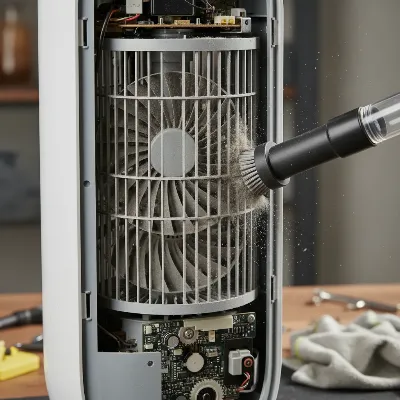 Disassembled Tower Fan Internal Cleaning Process
Reassembly and Testing
- Careful Reassembly: Once all parts are clean and completely dry, carefully reassemble your tower fan. Ensure all tabs align and screws are tightened securely. Do not overtighten, as this can crack plastic.
- Test the Fan: Plug your fan back into the power outlet and test all its functions, including different speeds, oscillation, and any special modes. Listen for any unusual noises, which might indicate a misaligned part or a missed screw.
Cleaning Different Types of Tower Fans
While the general principles remain the same, certain tower fan designs benefit from specific cleaning considerations.
Oscillating Tower Fans
These fans often have more exposed vents and intricate oscillation mechanisms, making them prone to dust accumulation in moving parts. Pay extra attention to the rear air intake grilles and the oscillation joints. If accessible, unscrew the rear panel to clean internal components more thoroughly, as indicated in your manual.
Bladeless Tower Fans
Bladeless fans, while seemingly easier to clean due to the lack of exposed blades, still accumulate dust within their internal air channels. For these models, compressed air becomes your best friend. Blast air into the intake and outlet slits to dislodge dust from the internal loop. Wipe the exterior surfaces with a damp cloth, drying thoroughly.
Tower Fans with Air Purifier Function
If your tower fan doubles as an air purifier, it will have removable filters. Regularly check your user manual for specific instructions on how to clean or replace these filters. Some are washable, while others require periodic replacement to maintain air purification efficiency. Clean the filter housing with a vacuum or soft brush when the filter is removed.
How Often Should You Clean Your Tower Fan? (Maintenance Schedule)
The frequency of cleaning depends heavily on usage, environment, and household factors.
- Light Usage (Occasional): Clean every 2-3 months.
- Moderate Usage (Daily for a few hours): Aim for a monthly clean.
- Heavy Usage (All-day operation, homes with pets, or individuals with allergies): Consider cleaning every 2 weeks.
- Seasonal Maintenance: Perform a thorough deep clean before storing your fan for the off-season and another detailed cleaning when you bring it out for regular use.
“Consistent small efforts in cleaning can prevent major headaches down the line. It’s about proactive care, not reactive repairs.” – An Expert Technician from ReviewSnobs.com
Advanced Maintenance: Troubleshooting Common Tower Fan Issues
Even with regular cleaning, tower fans can sometimes exhibit operational quirks. Knowing how to troubleshoot common problems can help you quickly diagnose and resolve them, prolonging your fan’s life.
Excessive Noise or Vibration
If your fan is rattling, buzzing, or vibrating excessively, it’s a sign something is amiss.
- Dust Accumulation/Unbalanced Blades: The most common culprit. Uneven dust buildup on the impeller blades can throw off their balance, causing vibration and noise. A thorough deep clean often resolves this.
- Loose Parts: Over time, internal screws, wiring, or casing components can come loose. If you can safely disassemble your fan, inspect for anything rattling and tighten screws.
- Faulty Motor or Bearings: If cleaning and tightening don’t help, the motor bearings might need lubrication (check your manual, as some fans have sealed, permanently lubricated bearings) or the motor itself may be failing, requiring professional service or replacement.
Weak Airflow
A noticeable drop in cooling power is almost always linked to airflow obstruction.
- Severe Dust Buildup: This is the primary cause. Revisit the deep cleaning steps, ensuring all grilles, vents, and internal blades are free of debris.
- Obstructions Near Intake/Outlet: Ensure there are no objects (furniture, curtains, walls) blocking the air intake or output vents. Maintain at least a 12-inch clearance around the fan for optimal performance.
- Damaged Blades: Bent or warped impeller blades cannot efficiently move air. If visible, gently try to bend minor warps back into place, or replace badly damaged blades if possible.
Intermittent Shut-Off
A fan that randomly turns off usually points to overheating or an electrical issue.
- Overheating: Excessive dust and debris blocking airflow can cause the motor to overheat, triggering a safety shut-off. A deep clean is critical here.
- Faulty Electrical Connection: Check the power cord for any visible damage, and ensure the plug is firmly seated in the outlet. Try plugging it into a different outlet to rule out a faulty wall socket.
Oscillation Not Working
If your fan stops rotating, the oscillation mechanism might be at fault.
- Faulty Oscillation Motor/Stripped Gears: The dedicated motor for oscillation or its connecting gears can wear out. This often requires internal inspection and potentially replacing the oscillation motor or gears.
- Loose Wiring: Wires connecting the oscillation motor can become loose. If you’re comfortable with safe disassembly, inspect and tighten connections.
Strange Odors
A musty, burning, or unusual smell emanating from your fan.
- Dust Buildup: The most frequent cause of musty smells. Dust and pet hair can trap odors. A thorough cleaning will typically eliminate this.
- Motor Overheating: A burning smell usually indicates an overheated motor, often due to significant dust accumulation causing strain. Unplug immediately and perform a deep clean. If the smell persists, discontinue use and seek professional help.
- Worn Components: Degrading plastic or electrical components can also produce unusual scents. If cleaning doesn’t resolve the issue, replacement parts or professional repair might be needed.
Tips to Extend Your Tower Fan’s Lifespan Beyond Cleaning
While cleaning is paramount, other practices contribute significantly to your tower fan’s longevity.
Optimal Placement
Where you place your fan matters.
- Avoid Dust-Prone Areas: Keep your fan away from heavy traffic areas, pet sleeping zones, and uncovered carpets, as these are significant sources of dust and pet hair.
- Maintain Clearances: Ensure the fan has adequate space around it for unobstructed air intake and expulsion.
- Protect from Extremes: Avoid placing your fan in direct sunlight, highly humid environments (like steamy bathrooms without proper ventilation), or areas with extreme temperature fluctuations, which can stress components.
Proper Storage
When the cooling season ends, don’t just shove your fan into a closet.
- Thorough Cleaning Before Storage: Always give your fan a deep clean before storing it for extended periods. This prevents dust from hardening and becoming more difficult to remove later.
- Use a Dust-Proof Cover: Cover your fan with a dedicated dust-proof cover, an old sheet, or even a large plastic bag to protect it from dust and moisture during storage.
- Store in a Dry Place: Choose a dry, clean, and temperature-stable environment for storage.
Regular Inspections
Even when not actively cleaning, a quick visual check can go a long way.
- Look for Wear and Tear: Periodically inspect the power cord for fraying or damage, and check the base for cracks or wobbles.
- Listen for Unusual Sounds: Pay attention to any new noises during operation. Early detection of unusual sounds can prevent minor issues from becoming major repairs.
Follow Manufacturer Guidelines
Your user manual is an invaluable resource. It provides specific instructions for your model, including safe disassembly, recommended cleaning agents, and any specific maintenance requirements or warnings. Adhering to these guidelines is crucial for maintaining your warranty and ensuring proper care.
Prevent Overloading
Operate your fan within its rated capacity. While tempting to run it on the highest setting constantly, using appropriate fan speeds for the cooling need can reduce motor strain and extend component life.
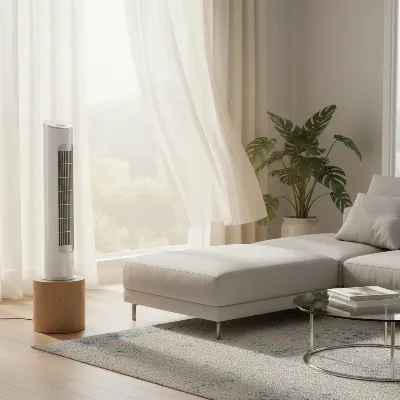 A Clean Tower Fan Providing Optimal Airflow in a Modern Room
Conclusion
Your tower fan works hard to keep your home cool and comfortable. By dedicating a little time to regular maintenance, you’re not just ensuring clean air and optimal performance; you’re also significantly extending its lifespan and safeguarding your investment for years to come. Proactive care, from routine cleaning to addressing minor issues promptly, transforms your tower fan from a disposable appliance into a long-lasting household staple. Embrace these essential tips, and your tower fan will continue to provide a refreshing breeze, quietly and efficiently, season after season.
What routine maintenance tasks have you found most effective for your tower fan’s longevity?
Frequently Asked Questions
How often should I clean my tower fan?
The frequency depends on usage and environment. For light use, clean every 2-3 months. For moderate daily use, clean monthly. If you have pets or allergies, or use the fan heavily, cleaning every 2 weeks is recommended. Always deep clean before and after seasonal storage.
Can I wash tower fan blades with water?
You can often wash removable grilles and some fan blades with warm, soapy water, but only if your user manual specifically states they are washable and detachable. Always ensure all parts are completely air-dried before reassembling to prevent electrical hazards and mold growth. Never use water near electrical components or the motor.
What causes a tower fan to make noise?
Excessive noise (rattling, buzzing, squeaking) is typically caused by dust buildup on the internal impeller blades, which creates imbalance, or by loose internal components like screws or casing parts. A thorough cleaning and checking for loose fittings often resolves these issues. If persistent, it might indicate a worn motor or bearings.
How does regular cleaning improve tower fan energy efficiency?
Regular cleaning improves energy efficiency by removing dust and debris that obstruct airflow. When a fan’s vents and blades are clean, its motor doesn’t have to work as hard to move air, reducing power consumption and potentially lowering electricity bills over time. This can lead to significant savings over the fan’s lifespan.
What are the best tools for deep cleaning a tower fan?
The best tools for deep cleaning a tower fan include a vacuum cleaner with a brush attachment, a can of compressed air, small soft brushes (like an old toothbrush), microfiber cloths, and cotton swabs. For models that allow disassembly, a screwdriver set is also essential to access internal components safely.
Is it safe to use cleaning sprays directly on a tower fan?
No, it is not safe to spray liquid cleaning agents directly onto a tower fan. Liquids can seep into electrical components, causing damage or creating an electrical hazard. Instead, lightly dampen a microfiber cloth with a mild cleaner and wring it out thoroughly before wiping exterior surfaces, ensuring no moisture enters vents or openings.
Frequently Asked Questions
How often should I clean my tower fan?
The frequency depends on usage and environment. For light use, clean every 2-3 months. For moderate daily use, clean monthly. If you have pets or allergies, or use the fan heavily, cleaning every 2 weeks is recommended. Always deep clean before and after seasonal storage.
Can I wash tower fan blades with water?
You can often wash removable grilles and some fan blades with warm, soapy water, but only if your user manual specifically states they are washable and detachable. Always ensure all parts are completely air-dried before reassembling to prevent electrical hazards and mold growth. Never use water near electrical components or the motor.
What causes a tower fan to make noise?
Excessive noise (rattling, buzzing, squeaking) is typically caused by dust buildup on the internal impeller blades, which creates imbalance, or by loose internal components like screws or casing parts. A thorough cleaning and checking for loose fittings often resolves these issues. If persistent, it might indicate a worn motor or bearings.
How does regular cleaning improve tower fan energy efficiency?
Regular cleaning improves energy efficiency by removing dust and debris that obstruct airflow. When a fan's vents and blades are clean, its motor doesn't have to work as hard to move air, reducing power consumption and potentially lowering electricity bills over time. This can lead to significant savings over the fan's lifespan.
What are the best tools for deep cleaning a tower fan?
The best tools for deep cleaning a tower fan include a vacuum cleaner with a brush attachment, a can of compressed air, small soft brushes (like an old toothbrush), microfiber cloths, and cotton swabs. For models that allow disassembly, a screwdriver set is also essential to access internal components safely.
Is it safe to use cleaning sprays directly on a tower fan?
No, it is not safe to spray liquid cleaning agents directly onto a tower fan. Liquids can seep into electrical components, causing damage or creating an electrical hazard. Instead, lightly dampen a microfiber cloth with a mild cleaner and wring it out thoroughly before wiping exterior surfaces, ensuring no moisture enters vents or openings.
How to Clean Your Tower Fan for Longevity
This guide provides step-by-step instructions for cleaning your tower fan, from exterior dusting to deep cleaning internal components, ensuring optimal performance and extended lifespan.
Always unplug your tower fan from the power outlet before starting any cleaning. Move the fan to a well-ventilated area, preferably outdoors, to prevent dust from resettling in your home. Consult your user manual to check if your specific model allows for safe disassembly.
Use a soft, dry microfiber cloth to wipe down the entire outer casing, removing loose dust. For stubborn grime, lightly dampen the cloth with mild dish soap and water, then wipe dry. Use a vacuum cleaner with a brush attachment and compressed air to clean dust from all air intake and outlet vents.
If your fan can be disassembled, carefully remove screws and separate the casing. Use a vacuum's brush attachment or compressed air to clean the internal impeller blades and inner housing. Avoid water near electrical components. If grilles or filters are washable, clean them with warm soapy water and ensure they are completely dry before reassembly.
Once all parts are clean and completely dry, carefully reassemble your tower fan, ensuring all tabs align and screws are securely tightened. Plug the fan back into the power outlet and test all functions, including different speeds and oscillation, listening for any unusual noises.

I always just wiped down my tower fan, but never really thought about deep cleaning it. The tip about using compressed air for those hard-to-reach spots made a huge difference! My fan was getting a bit noisy, and after following the guide, it’s running so much quieter now. Definitely worth the extra effort to keep it in top shape.
This guide is a lifesaver! I noticed my fan wasn’t pushing as much air as it used to, and I was worried I’d have to buy a new one. Following the steps for cleaning the blades and the base really improved its performance. It’s amazing how much dust can accumulate and reduce airflow by up to 30% without you even realizing it.
Some useful info, especially about how often to clean (every 2 weeks to 3 months depending on use). I tried to get into the internal components of my older Lasko fan, but it was really difficult to take apart without feeling like I was going to break it. Maybe it’s easier with newer models, but for mine, it felt a bit too complicated for a quick clean.
Good tips here. I’ve been pretty good about cleaning my fan every month or so, but I didn’t realize how much dust could build up inside the grille. The suggestion to check the manufacturer’s guide for specific disassembly instructions was helpful. My airflow feels much stronger after a thorough clean, though it took a bit longer than I expected.