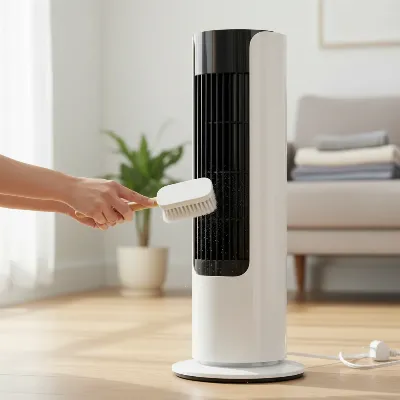
Bladeless tower fans are a marvel of modern engineering, offering sleek designs and powerful airflow without visible spinning blades. This design makes them safer and often quieter, but it doesn’t mean they are immune to dust accumulation. Over time, these fans can silently collect a significant amount of dirt and debris within their internal components, leading to reduced efficiency, diminished airflow, and potentially even affecting air quality. A regular exterior wipe isn’t enough to tackle the hidden dust bunnies clinging to the internal impeller and air pathways. This comprehensive guide will walk you through the process of carefully disassembling and deep cleaning your bladeless tower fan, helping you restore its original performance and ensure it continues to provide fresh, clean air.
Why Your Bladeless Tower Fan Needs a Deep Clean
Even though they lack traditional blades, bladeless tower fans draw in air from their base, passing it through an internal motor and impeller before expelling it through the top ring. This continuous movement of air naturally pulls in airborne particles like dust, pet dander, and allergens. These particles can then settle on the internal components, particularly the impeller and the narrow air channels. As dust builds up, it creates blockages, forcing the motor to work harder and diminishing the fan’s ability to circulate air efficiently. This can result in weaker airflow, increased noise, and a potential reduction in the lifespan of your appliance. Regular deep cleaning is essential to maintain peak performance, improve indoor air quality, and ensure your fan operates quietly and effectively for years to come.
Essential Tools for Bladeless Fan Disassembly and Cleaning
Before you begin the disassembly and cleaning process, gather all the necessary tools. Having everything at hand will make the task smoother and more efficient.
- Screwdrivers: You will likely need a Philips-head screwdriver, and for models like the Dyson AM07, a T8 Torx screwdriver is essential.
- Microfiber Cloths: For wiping down exterior and internal surfaces.
- Vacuum Cleaner with Brush Attachment: Ideal for suctioning loose dust from vents and internal components without scratching.
- Compressed Air Canister: Excellent for blowing dust out of hard-to-reach crevices and the impeller’s channels.
- Soft Brush or Old Toothbrush: Useful for gently dislodging stubborn dust from grilles and intricate parts.
- Cotton Swabs: Perfect for cleaning tight spaces and delicate areas.
- Mild Cleaning Solution (Optional): A diluted mixture of mild soap and water for wiping surfaces (ensure it’s not overly wet).
- Small Container: To keep screws organized and prevent them from getting lost.
Safety First: Before You Begin
Prioritizing safety is paramount when working with electrical appliances. Always take these crucial steps before attempting any cleaning or disassembly:
- Unplug the Fan: Absolutely disconnect your bladeless tower fan from its power source. This prevents accidental activation and eliminates the risk of electrical shock.
- Consult Your User Manual: This is a critical step. Some bladeless fan models, like certain Vornado fans, are not designed for user disassembly, and attempting to open them can void your warranty or cause irreparable damage. Your manual will provide specific instructions or warnings regarding cleaning and maintenance.
- Prepare Your Workspace: Choose a clean, well-lit area with a flat, stable surface where you can comfortably work. Lay down a towel or a mat to protect both your fan and your work surface. Keep a small container nearby to safely store any screws or small parts you remove.
Step-by-Step Disassembly and Cleaning Guide
Follow these steps carefully to ensure a thorough and safe deep clean of your bladeless tower fan. Remember that specific models may vary, so always refer to your fan’s manual for precise instructions.
Exterior Cleaning (Initial Step)
|
Our Picks for the Best Tower Fan in 2026
As an Amazon Associate I earn from qualifying purchases.
|
||
| Num | Product | Action |
|---|---|---|
| 1 | Lasko High Velocity Oscillating Tower Fan for Bedroom, Garage, Basement, and Gym with Remote Control, Timer, 3 Powerful Speeds, 35" Silver/Black, U35115 |

|
| 2 | LEVOIT Tower Fan for Bedroom, 25ft/s Velocity Standing Fan with 28dB Quiet for Sleep, Remoter, 12H Timer, 5 Speeds, 4 Modes, 90° Oscillation for Home, Office, Indoor, Bladeless 36 inch, White |
|
| 3 | Lasko Elevation Adjustable Tower Fan 42”-54”, Pedestal Fan, 31 ft/s Airflow, Quiet 28 dB, 90° Oscillation, 12h Timer, Remote, Black, EST100 |
|
| 4 | Dreo Tower Fan for Bedroom, 25ft/s Velocity Quiet Floor Fan, 90° Oscillating Fans for Indoors with 4 Speeds, 4 Modes, 8H Timer, Bladeless Fan, Standing Fans, Silver, Nomad One (DR-HTF007) |
|
| 5 | Dreo Tower Fan for Bedroom, 2026 Upgraded DC Motor, 28ft/s High Velocity, 20dB Ultra Quiet Standing Fan, 8 Speeds 4 Modes, 90° Oscillating Bladeless Fan for Indoors, Floor Fans with Remote, Black |
|
| 6 | PELONIS 40-Inch Tower Fan for Bedroom, Fan That Blows Cold Air, Oscillating Fan with Innovative Washable Design, 2000 CFM, 28ft/s Airflow, 4 Speeds + 2 Modes, 90° Oscillation, 23dB Quiet |
|
| 7 | Honeywell QuietSet Whole Room Tower Fan-Black, Oscillating Tower Fan with Remote, HYF290B |
|
| 8 | Honeywell QuietSet Whole Room Oscillating Tower filter Fan with Remote, White, HYF260 |
|
| 9 | Dreo Tower Fan for Bedroom, 90° Oscillating Standing Fans for Room with 4 Speeds, 3 Modes, 28dB Quiet for Sleep, 25ft/s Velocity, 8H Timer, Remote, Living Room, Office, Home, Black |
|
| 10 | DREO Tower Fan for Bedroom, 4 Speeds, 3 Modes Standing Fans for Room with 90° wide Oscillating, 28dB Quiet for Sleep, 25ft/s Velocity, 29ft Coverage, 8H Timer, Remote, Living Room, Office, Home, White |
|
Even before diving into the internal components, a quick exterior clean can remove superficial dust and give you a clearer view of the fan’s construction.
- Wipe Down the Exterior: Use a soft, slightly damp microfiber cloth to wipe down the entire outer surface of the fan, including the base, control panel, and the outer ring.
- Vacuum Vents: Use your vacuum cleaner with the brush attachment to thoroughly clean the air intake vents, typically located at the base of the fan, and any exhaust vents. These areas are prone to collecting a lot of visible dust and debris.
Removing the Top Air Multiplier Ring
For many bladeless tower fans, particularly Dyson models, the top air multiplier ring can be detached from the base unit.
- Twist and Lift: Hold the base of the fan securely with one hand. With the other hand, grasp the top circular or oval air multiplier ring and gently twist it counter-clockwise. You should feel it unlock from the base.
- Separate the Ring: Once unlocked, carefully lift the top ring straight up from the base.
- Clean the Ring: The interior of this ring can accumulate dust. If your manual permits, you can rinse the ring with water, ensuring it’s completely dry before reassembly, or wipe it thoroughly with a damp cloth and then dry it. Pay attention to the air outlet slit. Note: Some sources indicate that the ring on certain models, like the Dyson AM07, is ultrasonically welded and not designed for further internal disassembly without permanent damage. For these, focus on cleaning the visible slits with compressed air or a thin, damp cloth.
Accessing the Internal Motor and Impeller
This is where you’ll get to the heart of the fan’s dust collection problem: the impeller and motor housing.
- Locate Screws: Examine the base unit of your fan for screws that hold the casing together. For Dyson AM07, you’ll typically find a single T8 Torx screw on the outer retainer near the base. Other brands might use Philips-head screws.
- Remove Screws: Use the appropriate screwdriver to carefully remove all visible screws. Place them immediately into your small container to avoid losing them.
- Gently Pry Casing: After removing the screws, the casing might still be held in place by internal clips or tabs. Carefully and gently pry open the casing, starting from the area closest to where you removed the screws. Work your way around, using a flat-head screwdriver or a plastic prying tool if necessary, but avoid excessive force to prevent breaking tabs.
- Lift Assembly: Once the casing is loose, you should be able to carefully lift off the outer retainer or the entire motor-turbine assembly from the main housing. Be mindful of any connected wires; typically, the motor assembly will remain connected by wires to the base.
Cleaning the Impeller and Internal Housing
With the internal components exposed, you can now perform a thorough deep clean.
- Clean the Impeller: The impeller is a cylindrical component with many small fins or channels. This is where dust and debris tend to accumulate most heavily.
- Vacuum: Use the brush attachment of your vacuum to suction dust directly from the impeller’s surface and between its fins. Slowly rotate the impeller to clean all sides.
- Compressed Air: For stubborn dust embedded deep within the impeller’s channels, use a can of compressed air. Blast air into the channels to dislodge debris.
- Soft Brush/Cotton Swab: For any remaining grime, gently use a soft brush or cotton swabs to clean individual fins.
- Optional Impeller Detachment (Advanced): Some models may allow the impeller to be further detached from the motor by unscrewing additional screws on the stator. If your manual explicitly outlines this, you might be able to remove and even gently rinse the impeller, ensuring it’s completely dry before reassembly. This is generally recommended only if extensive build-up requires it and you are confident in your ability to reassemble.
- Clean the Internal Housing and Intake Holes:
- Vacuum: Use your vacuum cleaner to remove any dust and dirt from the inside of the fan’s base housing, including the air intake holes and surrounding areas.
- Brush: A bristled brush can be effective for scrubbing dirt from the air intake grilles inside the housing, followed by vacuuming.
- Wipe: Use a slightly damp microfiber cloth to wipe down any accessible hard plastic surfaces inside the housing.
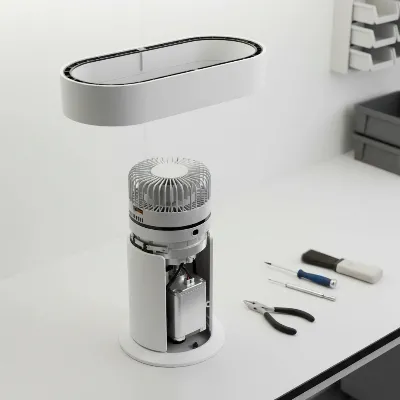 Bladeless tower fan disassembled, showing internal impeller and motor base for cleaning
Reassembly
Once all components are clean and dry, it’s time to put your fan back together.
- Reverse the Disassembly: Carefully place the motor-turbine assembly back into the housing, ensuring any wires are not pinched.
- Secure Casing: Align the outer casing or retainer, making sure all internal tabs click into place.
- Replace Screws: Securely reinsert all screws, tightening them gently but firmly. Do not overtighten, as this can strip the plastic threads.
- Reattach Top Ring: Align the top air multiplier ring with the base, ensuring it sits correctly. Twist it clockwise until it locks firmly into place.
- Final Check: Before plugging it in, do a visual check to ensure all parts are properly secured and there are no loose components.
General Tips for Maintaining Your Bladeless Tower Fan
Beyond deep cleaning, adopting regular maintenance habits can significantly extend the life and efficiency of your bladeless tower fan.
- Regular Dusting: Make it a habit to wipe down the exterior of your fan with a microfiber cloth at least once a week. This prevents heavy dust buildup.
- Vacuum Vents Frequently: Use your vacuum’s brush attachment on the intake vents every couple of weeks. This simple step can prevent a lot of dust from entering the internal system.
- Optimal Placement: Position your fan in areas with less airborne dust, away from carpets, pet bedding, or heavy foot traffic, if possible.
- Seasonal Storage: If you store your fan during off-seasons, ensure it’s clean and completely dry. Cover it with a dust-proof cover or store it in its original box to protect it from accumulating dust.
- Monitor Performance: Pay attention to any changes in airflow, noise levels, or unusual smells. These can be indicators that your fan is due for a cleaning.
Conclusion
Deep cleaning your bladeless tower fan is an often-overlooked but vital aspect of appliance maintenance. By carefully disassembling the unit and thoroughly cleaning its internal components, you can combat dust accumulation, improve airflow, and extend the lifespan of your fan. While the process may seem daunting, the benefits of cleaner air and optimal performance are well worth the effort. Remember to always prioritize safety by unplugging the fan and consulting your user manual. With a little care and regular maintenance, your bladeless tower fan will continue to be a silent, powerful, and efficient companion in keeping your space comfortable.
Frequently Asked Questions
How often should I deep clean my bladeless tower fan?
The frequency depends on usage and environment. For light use in a relatively clean home, once or twice a year might suffice. In homes with pets, allergies, or heavy daily use, consider a deep clean every 3-6 months. Regular exterior dusting and vent vacuuming should be done weekly or bi-weekly.
Can all bladeless tower fans be disassembled for cleaning?
No, not all bladeless Tower Fans are designed for user disassembly. Some models, particularly from certain brands, are sealed units where opening them can void the warranty or cause damage. Always consult your specific fan’s user manual before attempting any disassembly.
What if my fan is still noisy after cleaning?
If your fan remains noisy after a thorough cleaning, it could indicate an issue with the motor bearings or other internal components that are beyond a simple cleaning fix. In such cases, it’s best to contact the manufacturer’s customer support or a qualified technician. Avoid attempting complex repairs if you’re not experienced.
Can I use water to clean the internal components?
Only use water on components that are explicitly stated as washable in your fan’s manual, such as certain detachable filters or outer rings. The internal motor, impeller, and electrical components should never be cleaned with water. Always ensure any washable parts are completely dry before reassembling.